Tools & ACL Security
AI In A Box supports function calling (tools) that allow the LLM to retrieve data and perform actions in ServiceNow. When enabled, Tools ACL Security ensures these tool calls respect the requesting user's access controls.
What Are Tools?
Tools are functions that the LLM can call during a conversation. For example:
- get_incident - Look up incident details by number or caller
- search_knowledge - Search knowledge base articles
- search_catalog - Search service catalog items
When a user asks "What laptop options do we have in the service catalog?", the LLM can call the search_catalog tool to fetch real data instead of making up an answer.
Why ACL Security Matters
Without ACL security, tools run as the integration user (e.g., aiab_service), which typically has elevated permissions. This means:
- Users could access data they shouldn't see
- Field-level ACLs would be bypassed
- Sensitive information could be exposed
With ACL security enabled, tool calls execute as the requesting user, ensuring all ServiceNow access controls are enforced through GlideRecordSecure.
How It Works
in ServiceNow AI Chat"] AI["2️⃣ AI In A Box Server
LLM decides to call a tool"] SN2["3️⃣ ServiceNow executes tool
with GlideRecordSecure ACLs"] SN1 -->|"What laptops are available?"| AI AI -->|"Call search_catalog"| SN2 SN2 -->|"Filtered results
(only items user can see)"| AI AI -->|"Here are 3 laptop options..."| SN1 style SN1 fill:#e3f2fd style AI fill:#fff3e0 style SN2 fill:#e8f5e9
View step-by-step breakdown
- 1️⃣ ServiceNow - User Session: User asks a question in the AI In A Box chat widget
- 2️⃣ AI In A Box Server: LLM decides to call a tool (e.g.,
search_catalog) - 3️⃣ ServiceNow - Tool Execution:
- 3a. Authenticate callback from AI server
- 3b. Execute tool script as requesting user
- 3c.
GlideRecordSecureenforces ACLs - only accessible data is returned
- Back to User: Filtered results are sent back through the LLM to the user
Tool Selection Behavior
AI In A Box intelligently controls which tools are available to the LLM:
- No tools specified on the inference: All active tools from the
u_ai_tooltable are sent to the LLM as possibilities - Tools specified on the inference: Only the specific tools selected for that inference are sent to the LLM
This allows you to create focused experiences. For example, a "Service Catalog Assistant" inference might only include the search_catalog and create_request tools, while a general-purpose assistant might include all available tools.
Setup Requirements
To enable Tools ACL Security, you need two components:
1. Service Account with Admin Role
Create a dedicated service account that will authenticate callbacks:
- Go to User Administration > Users
- Create a new user (e.g.,
aiab_service) - Set a strong password
- Grant the admin role
admin role to execute tools via REST API callbacks. The actual data access is governed by the requesting user's ACLs through GlideRecordSecure.
2. Callback Auth Property
Set the system property that stores the service account credentials:
ai_in_a_box.config.server.callback.auth = aiab_service:your-passwordThe AI In A Box server uses these credentials for Basic Authentication when calling back to ServiceNow to execute tools. ServiceNow's REST API authentication validates these credentials before any tool execution occurs.
Enable Tool Calling
Once the service account is configured, enable the tool calling feature:
- Navigate to the AI In A Box Settings page in Service Portal
- Find the Tool Calling feature box
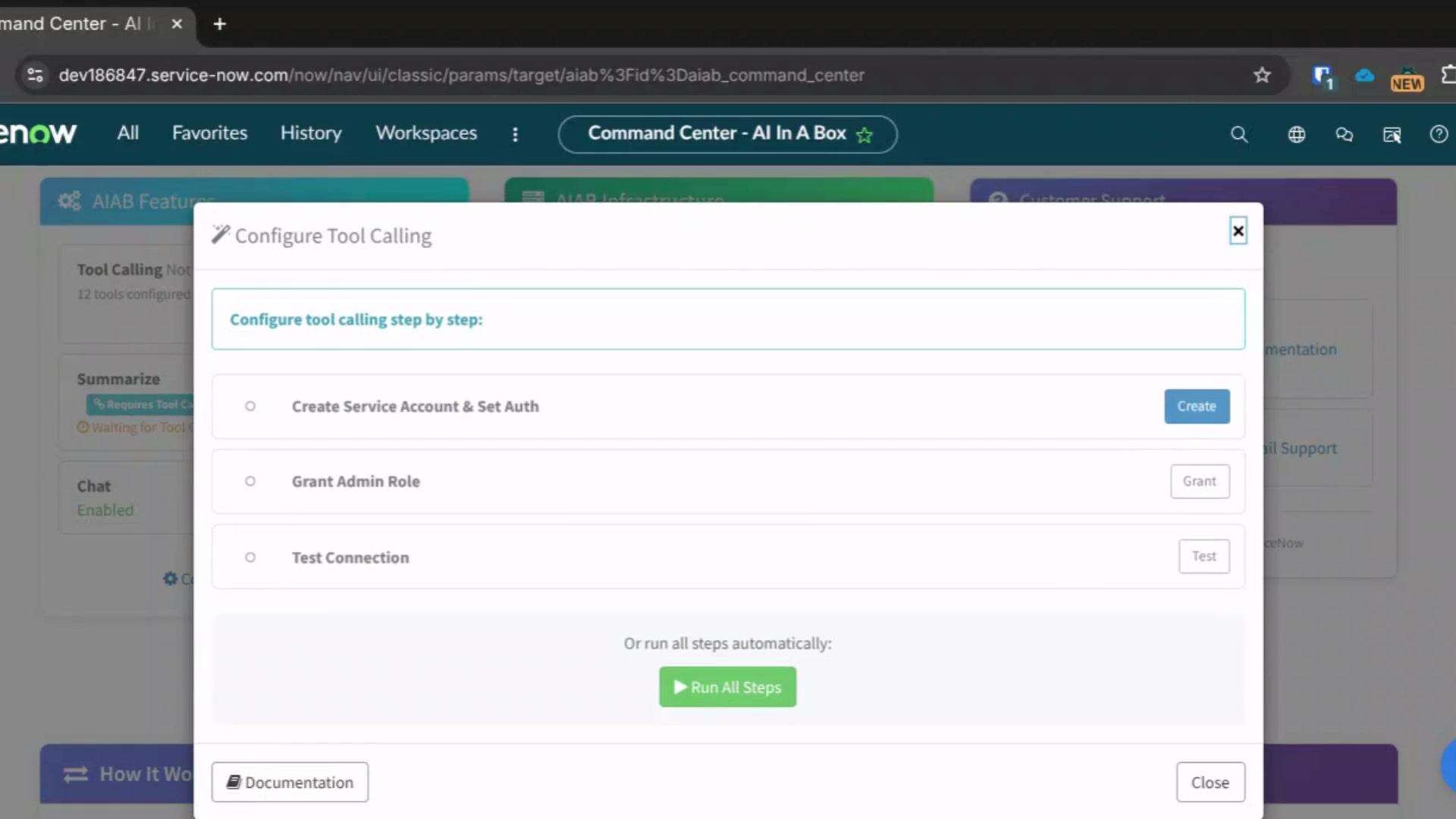
- Click Configure to open the setup wizard
- Follow the 3-step wizard:
- Step 1: Create Service Account & Set Auth Property
- Step 2: Grant Admin Role
- Step 3: Test Connection
Video Walkthrough
Watch this step-by-step video demonstrating how to set up Tool Calling:
Click to play video (56 seconds)
Writing ACL-Safe Tool Scripts
When creating tools, follow these best practices to ensure ACLs are respected:
Use GlideRecordSecure
Always use GlideRecordSecure instead of GlideRecord:
(function(args, userId) {
    // GOOD: Uses GlideRecordSecure which respects ACLs
    var gr = new GlideRecordSecure('sc_cat_item');
    if (gr.get('sys_id', args.item_id)) {
        return {
            name: gr.getValue('name'),
            short_description: gr.getValue('short_description'),
            price: gr.getDisplayValue('price')
        };
    }
    return { error: 'Catalog item not found' };
})(args, userId);
Check Field-Level Access
For sensitive fields, explicitly check read access:
(function(args, userId) {
    var gr = new GlideRecordSecure('incident');
    if (gr.get('number', args.number)) {
        var result = {
            number: gr.getValue('number'),
            short_description: gr.getValue('short_description')
        };

        // Only include caller_id if user can read it
        if (gr.caller_id.canRead()) {
            result.caller_id = gr.getDisplayValue('caller_id');
        }

        return result;
    }
    return { error: 'Incident not found' };
})(args, userId);
Avoid ACL Bypasses
Never use:
gr.setWorkflow(false)to bypass business rulesGlideRecorddirectly (useGlideRecordSecurefor ACL enforcement)
Troubleshooting
"Not Configured" Status
If the Tool Calling feature shows "Not Configured":
- Click the Configure button in the Tool Calling row
- Complete all 3 steps in the setup wizard
- The status will change to "Enabled" once the service account and auth property are configured
Tool Returns 401 Unauthorized
- Check
ai_in_a_box.config.server.callback.authcontains valid credentials - Verify the service account is active and not locked out
- Confirm the password is correct (format:
username:password) - Ensure the service account has the admin role
Tool Returns No Data (But Should)
- The user may not have access to the record (ACL working correctly!)
- Check the user's roles and group memberships
- Review the table and field-level ACLs
- Verify the tool script uses
GlideRecordSecure
Connection Test Fails
If Step 3 (Test Connection) in the setup wizard fails:
- Verify the service account password is correct
- Check that the auth property format is
username:password - Try using the Force button on Step 1 to reset the password
- Check ServiceNow system logs for authentication errors
Example: search_catalog Tool
Here's a complete example of the search_catalog tool that searches service catalog items:
Parameters
{
  "type": "object",
  "properties": {
    "query": {
      "type": "string",
      "description": "Search text to find in catalog item name or description"
    },
    "category": {
      "type": "string",
      "description": "Catalog category name to filter by"
    },
    "limit": {
      "type": "integer",
      "description": "Max items to return (default 5, max 10)"
    },
    "portal_suffix": {
      "type": "string",
      "description": "The portal suffix e.g. sp of service-now.com/sp the user is in and blank for core ui"
    }
  },
  "required": []
}
Script
(function(args, userId) {
    // Use GlideRecordSecure to respect ACLs of the requesting user
    var catalogItemGR = new GlideRecordSecure("sc_cat_item");
    catalogItemGR.addQuery("active", true);

    if (args.query) {
        var query = "nameCONTAINS" + args.query;
        query += "^ORshort_descriptionCONTAINS" + args.query;
        query += "^ORdescriptionCONTAINS" + args.query;
        catalogItemGR.addEncodedQuery(query);
    }

    if (args.category) {
        var catGR = new GlideRecord("sc_category");
        catGR.addQuery("title", "CONTAINS", args.category);
        catGR.setLimit(1);
        catGR.query();
        if (catGR.next()) {
            catalogItemGR.addQuery("category", catGR.getUniqueValue());
        }
    }

    catalogItemGR.setLimit(Math.min(args.limit || 5, 10));
    catalogItemGR.query();

    var items = [];
    while (catalogItemGR.next()) {
        var link = false;
        if (args.portal_suffix) {
            link = '/' + args.portal_suffix + '?id=sc_cat_item&sys_id=' + catalogItemGR.getValue('sys_id');
        } else {
            link = '/now/nav/ui/classic/params/target/com.glideapp.servicecatalog_cat_item_view.do?v=1&sysparm_id=' + catalogItemGR.getValue('sys_id');
        }

        items.push({
            name: "" + catalogItemGR.name,
            short_description: "" + catalogItemGR.short_description,
            category: catalogItemGR.getDisplayValue("category"),
            price: "" + catalogItemGR.price,
            link: link
        });
    }

    if (items.length === 0) {
        return { found: false, message: "No catalog items found" };
    }

    return { found: true, count: items.length, items: items };
})(args, userId);
Security Considerations
Service Account Security
The service account has admin role, but this is mitigated by:
- Tool scripts use
GlideRecordSecurewhich enforces the requesting user's ACLs - Only data the user can access is returned
- All tool executions are logged in the
u_ai_inferencetable - Credential storage is encrypted in ServiceNow properties
Best Practices
- Use a dedicated service account (not a real person's account)
- Set a strong, unique password
- Rotate the password periodically
- Monitor the
u_ai_inferencetable for unusual activity - Review tool scripts for ACL compliance before deployment
Audit Trail
All tool executions are logged in the u_ai_inference table, including:
- The requesting user (
u_requested_by) - Tools called and their arguments (
u_tool_calls) - Results returned to the LLM
Support
Need help setting up Tools ACL Security?
- Contact Support
- Schedule a call with our team